Sentry Springboot
Sentry is one of the most powerful tools I have come across to get error alerting, and it shortens the time from detecting an issue to fixing the issue.
Ten error logs are simple to handle, but a storm of errors at 2 am is a developer’s worst nightname.
What problem does Sentry solve?
For developers
- Sentry SaaS is easy to configure OR you can host it yourself.
- To send an issue to Sentry, all you need to do is write a
log.error(). There are other methods, but for the example we use Logback - All similar errors are put into a single issue. So 1 error that happens 10,000 is a single issue that links to the 10,000 occurrences.
- Bugs are picked up faster and can be detected before a user reports the issue.
For non-developers
- A bug in production costs reputation and costs hours to debug in production.
- The faster a bug can be detected and resolved has obvious benefits for the above.
- Bugs are picked up faster and can be detected before a user reports the issue.
For everyone who considers security important
- Security is for everyone, don’t skip this section!
- Sentry is both a SaaS solution OR you can host it yourself.
- PII data such as IP addresses, email addresses, passwords and custom defined data can be scrubbed before it is sent.
- Data is sent to a DSN which is just a long URL. Read the explainer for more details.
{PROTOCOL}://{PUBLIC_KEY}:{SECRET_KEY}@{HOST}{PATH}/{PROJECT_ID}
Deployment options for Sentry
The SaaS Sentry option
- For Sentry SaaS you can choose to send your data to Frankfurt, Germany (EU) or Iowa, USA.
- For DORA, Sentry can sign a DORA addendum, but you need to be an Enterprise customer.
- Single sign on and 2FA user login is available.
Host Sentry yourself option
- You can also set up Sentry in Kubernetes with this helm chart.
- You can also monitor Kubernetes with sentry-kubernetes.
- The maintenance of Sentry will be up to you.
Setting up the example code
This is a simple project that demonstrates how to set up Sentry SaaS and how to trigger two issues. Instructions to set up the Springboot Logback Maven project will follow below.
The simple demonstration
  sequenceDiagram
    participant U as User
    participant C as ProblematicRestController
    participant G as GlobalExceptionHandler
    participant LA as Logback SentryAppender
    participant S as Sentry DSN (HTTP)

    U->>C: GET /divide?by=0
    C-->>C: ArithmeticException
    C->>G: throws Unknown Exception
    G->>G: log.error(..., ex)
    G->>LA: log event
    LA->>S: HTTP POST payload
User calls divide by 0
Consider this problematic example buggy code in Springboot that was introduced.
It works great except if a user enters a by of zero, you would get an arithmetic error.
@GetMapping(path = "/divide")
public String division(@RequestParam Integer by) {
    return Integer.toString(100 / by);
}
Global Exception Handler handles the unknown exception
@ControllerAdvice
public class GlobalExceptionHandler {

    private static final Logger log = LoggerFactory.getLogger(GlobalExceptionHandler.class);

    @ExceptionHandler(Exception.class)
    public ProblemDetail handleException(Exception ex) {
        ProblemDetail problemDetail = ProblemDetail.forStatus(500);
        problemDetail.setTitle("Internal Server Error");
        problemDetail.setDetail(ex.getMessage());

        //send to Sentry via Logback
        log.atError().setMessage("Unknown Exception").setCause(ex).log();
        return problemDetail;
    }
}
Logback receives the error log
Add a new logback.xml or and the Sentry appender and send it to SentryAppender
<configuration>
    <appender name="Console" class="ch.qos.logback.core.ConsoleAppender">
        <encoder>
            <pattern>%d{HH:mm:ss.SSS} [%thread] %-5level %logger{36} - %msg%n</pattern>
        </encoder>
    </appender>
    <appender name="Sentry" class="io.sentry.logback.SentryAppender">
        <minimumEventLevel>ERROR</minimumEventLevel>
        <minimumBreadcrumbLevel>DEBUG</minimumBreadcrumbLevel>
    </appender>

    <root level="INFO">
        <appender-ref ref="Console"/>
        <appender-ref ref="Sentry"/>
    </root>
</configuration>
Sentry now processes the message
Now consider if this bug did just occur once, but thousands of time.
Sentry identifies the issue via an email or Slack message:
- There is an issue
- When the issue started
- How often the issue is happening
- How many users are effected
- Which version of the software introduced the bug
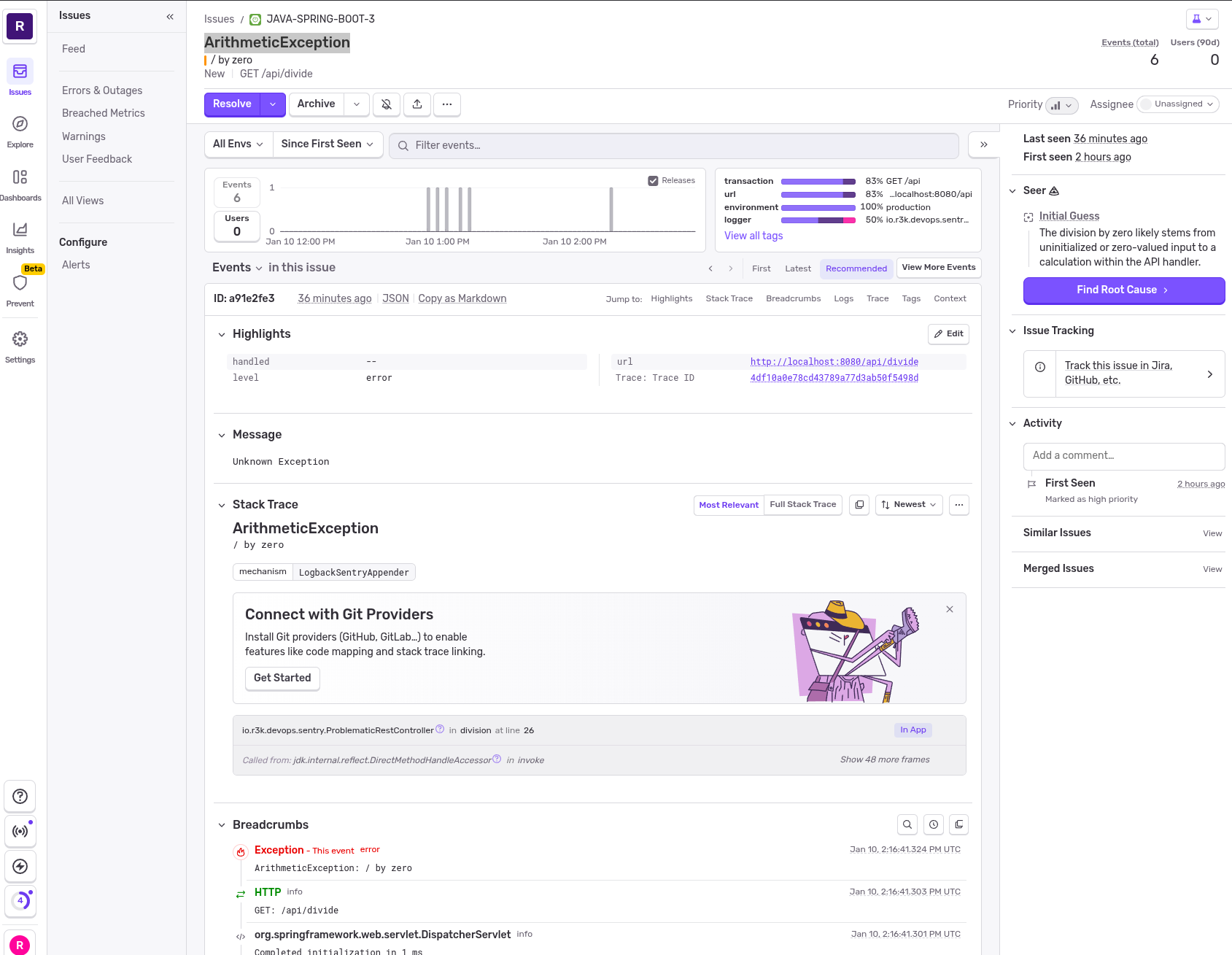
From this point in Sentry you can:
- Assign a person to look at the issue
- Ignore the issue
- Mark the issue as resolved, and it occurs again you will get a regression message
- Integrate with JIRA
When an error is not an error (false positive)
A common situation is when an error becomes normal.
Consider the error that occurs when a webcrawler scans your service and you get:
favicon.ico not found
This error may be pushed to Sentry and then can be muted.
Warning
Sentry SaaS charges per call. So you should limit the number of issues sent to Sentry
How to setup Springboot with Sentry
Maven
Add these to your maven pom.xml
For more info refer to the Sentry documentation.
<dependency>
    <groupId>io.sentry</groupId>
    <artifactId>sentry-spring-boot-4-starter</artifactId>
</dependency>
<dependency>
    <groupId>io.sentry</groupId>
    <artifactId>sentry-logback</artifactId>
</dependency>

<dependency>
    <groupId>org.slf4j</groupId>
    <artifactId>slf4j-api</artifactId>
</dependency><dependency>
<groupId>io.sentry</groupId>
<artifactId>sentry-spring-boot-starter-jakarta</artifactId>
</dependency>
<dependency>
<groupId>io.sentry</groupId>
<artifactId>sentry-logback</artifactId>
</dependency>
<dependency>
<groupId>org.slf4j</groupId>
<artifactId>slf4j-api</artifactId>
</dependency>Add non dynamic settings in a sentry profile
# Non-dynamic settings for Sentry
sentry:
  send-default-pii: false
  logs:
    enabled: true
Obtaining your DSN from Sentry SaaS
- Sign up for a Sentry demo account
- Create a new project based on Java and Logback
- Obtain the custom DSN
- Send error logs to your application
Start Sentry
SENTRY_DSN="Your Personal DSN"
SENTRY_ENVIRONMENT=development
SENTRY_RELEASE='my-sentry@0.1.0'

mvn spring-boot:run -Dspring-boot.run.profiles=sentry